Assign Resources
Once you have identified your control accounts and defined the work packages for the control accounts, the next step is to assign resources to those work packages. The resource structure assigned to the project determines the resources available to assign to the work packages. Usually the lowest level resources in the resource structure hierarchy are assigned to the work packages. The resource structure determines how rates are applied to the resource base result values such as labor hours, material direct costs, or travel direct costs.
When you have implemented the change control workflow process on your project, do not change your budget data in EVMax. This includes work packages, resource assignments, and time phased values. The change control process assumes you are using BOEMax to maintain a historical archive of the budget changes. All changes, including updates for rolling wave planning, are first modeled in BOEMax and once approved, the changes are merged into EVMax to maintain the budget data. The shared workflow functions ensure all changes to the baseline data are automatically documented using the source data in BOEMax and EVMax.
 Implementation Tips
- The resource structure determines how rates are applied. Typically the base result rate calculations are set at the lowest level in the resource hierarchy. Be sure to assign resources with defined rate calculations. When rate calculations are missing, direct costs or indirect costs aren't calculated. For the same reason, should you need to add a resource in the resource structure, make sure to set the rate calculations.
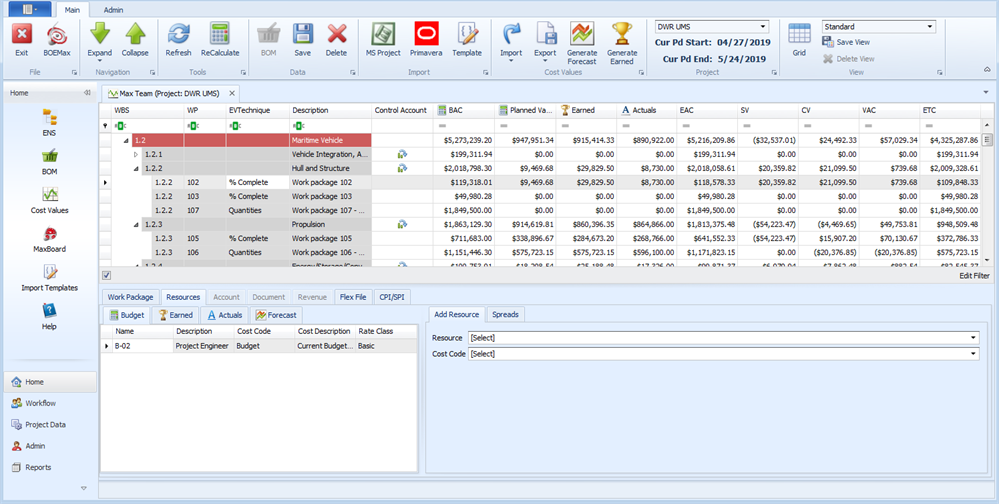
Main EVMax Window, Resources Tab
Standard View
What to Do Next
- Once you have assigned resources to the work packages, enter the resource labor FTEs/hours or non labor direct cost base result values in the applicable calendar month or time phase the values within the work package start and end dates. See Enter Base Values.